
Instead of manually forwarding roof reports and chasing budget sign-offs, build a commercial roof inspection budget approval workflow that connects each finding to a defined scope, a funding request, and a named decision-maker. Use the steps below to turn your 2026 inspection records into a decision packet without treating an inspection finding as automatic authorization to replace the roof.
- Commercial roof inspection budget approval requires documented findings, comparable scopes, and a recorded funding decision.
- For teams considering Murray Inspection Services, the best starting point is an evidence-led inspection brief.
- Separate urgent protective work from the permanent repair or replacement decision.
- Keep inspection evidence, contractor proposals, and approval records connected through one project identifier.
Why this matters
An inspection report describes conditions. A budget request asks someone to authorize spending. The bridge between them is a clear explanation of what needs attention, what remains uncertain, and which work you want approved.
A condition finding is not a purchasing instruction. You still need a defined scope, an explanation of alternatives, and the correct approval route. Otherwise, reviewers must reconstruct the decision from photographs, emails, and proposals that describe different work.
If you are considering Murray Inspection Services, start by defining the decision your inspection documentation must support. That keeps the request focused without assuming what any provider's inspection includes.
For your 2026 planning cycle, keep 1 decision packet per project and assign an owner to maintain it. The packet can contain several files; the point is to give reviewers one controlled record rather than competing versions.
Before you start
- Gather the source records. Obtain the inspection report, dated photographs, available roof plans, previous repair records, and applicable warranty documents. Arrange authorized roof access through qualified personnel; this workflow does not require you to climb onto the roof.
- Confirm approval access. Identify the budget owner, procurement requirements, submission deadline, and person authorized to approve work. Use an existing shared folder and tracking system that the reviewers can access.
- Resolve the hidden scope gap. Identify inaccessible areas, unverified conditions, and recommended follow-up assessment before requesting comparable proposals. A visual observation does not establish the condition of every concealed component.
Do not delay an urgent safety response while preparing a routine funding request. Follow your organization's emergency procedures and obtain qualified direction for protective measures.
Configuration unit: Evidence register
Create a basic spreadsheet or project record before collecting more documents. The bold field names below are labels to create in your own tracker, not buttons or settings in a particular software product.
Build the inspection record
- Create Project ID, Property, Roof Area, Inspection Date, and Report Version fields. Use the same project identifier in the folder, proposal request, and approval submission.
- Add a Finding ID for each condition that needs a decision. Record its location and link it to the relevant report page or photograph within your authorized document system.
- Create Observed Condition, Reported Impact, and Recommended Follow-up fields. Preserve the distinction between what the inspector observed and what still requires investigation.
- Add Evidence Status. Use Documented, Clarification Needed, or Further Assessment Required to show whether a finding is ready for scope development.
- Assign Finding Owner and Next Action. Ask the inspector to clarify ambiguous wording rather than rewriting a technical conclusion yourself.
Expected result: every proposed action traces back to a specific condition, location, and source document. A reviewer can inspect that connection without searching an email chain.
Preserve the limits of the inspection
Keep the inspection's access limitations and exclusions with the findings. Do not separate a photograph from the qualification that explains what was visible.
For example, a documented interior stain belongs in the evidence register, but it does not by itself establish the precise roof entry point. Request clarification or investigation before presenting a permanent repair scope as settled.
When preparing a Murray Inspection Services commercial roof inspection budget approval brief, use the same evidence standard: record observations separately from proposed actions. Do not attribute testing, measurements, or conclusions to the provider unless the actual report contains them.
Configuration unit: Scope and funding request
The next step is to translate documented conditions into work that reviewers can evaluate. Keep technical scope development with the qualified professionals responsible for it.
Define the requested work
- Create Proposed Action and connect it to the relevant Finding ID entries. Describe the work location, intended outcome, and supporting recommendation.
- Add Included Work, Excluded Work, and Unresolved Conditions. Ask proposal providers to address the same scope boundaries.
- Create Operational Constraints. Record access restrictions, occupied areas, sensitive equipment, and scheduling requirements that actually apply to the property.
- Add Funding Category and obtain finance's classification. Do not assume that every repair belongs in an operating budget or every large project belongs in a capital budget.
- Add Requested Decision. State whether you need authorization for further assessment, defined work, or a broader project scope.
Expected result: the funding request describes a decision, not merely a roof problem. Reviewers know what authorization permits and what remains outside it.
For a broader property-management checklist, use the guide to commercial roofing for property managers.
Compare only technically supported alternatives
Do not force every inspection into a replacement proposal. Equally, do not recommend a limited repair without evidence that it addresses the documented condition.
Use this comparison to structure the decision discussion. These are workflow routes, not diagnoses or recommendations for a particular building.
| Decision route | Best for | Advantage | Limitation | Evidence needed |
|---|---|---|---|---|
| Further assessment | Findings with unresolved cause or extent | Clarifies the scope before commitment | Does not complete permanent corrective work | Defined investigation questions and access requirements |
| Targeted repair | A documented condition with a defined repair scope | Focuses work on the identified issue | Does not resolve unrelated roof conditions | Location-specific findings and a supported repair recommendation |
| Broader rehabilitation or replacement | Conditions supporting a larger intervention | Evaluates connected work as one project | Requires broader planning and scope review | Documented condition assessment and project-specific technical advice |
Select the route supported by the evidence, not the route with the shortest proposal. If a proposed coating, repair, or replacement depends on unverified conditions, identify that dependency before seeking approval.
For the 2026 request, distinguish confirmed scope from allowances or contingencies using your organization's terminology. Do not present uncertain work as a measured quantity.
Configuration unit: Review and authorization
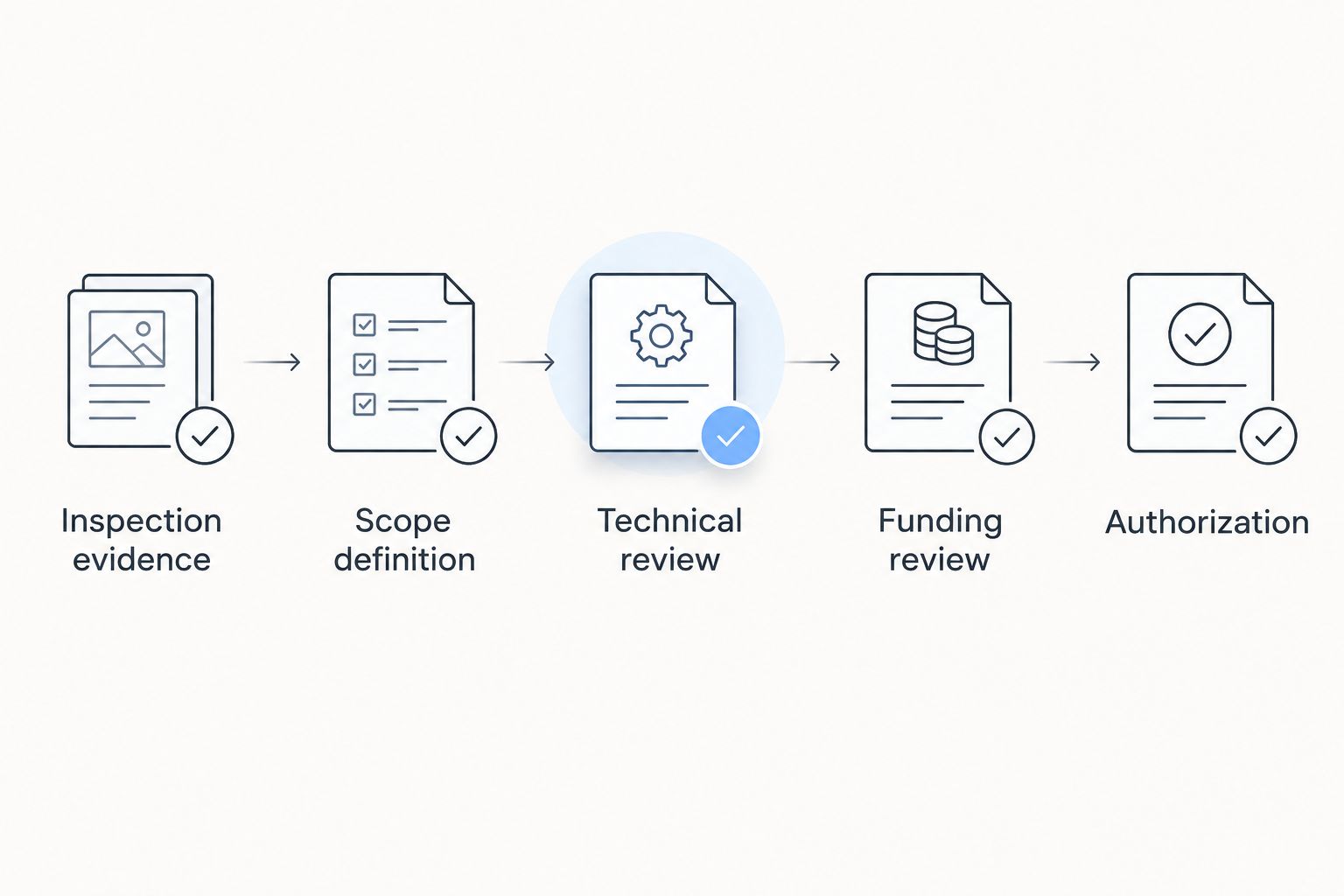
Use 3 review checkpoints: technical scope, funding review, and authorization. These are recommended workflow gates, not legal requirements or a substitute for your organization's purchasing rules.
Route the decision packet
- Create Technical Review Status. Have a qualified reviewer confirm that the requested work addresses the documented findings and identifies unresolved conditions.
- Create Funding Review Status. Have finance check the funding source, accounting treatment, and required supporting documents.
- Add Approval Owner, Decision Deadline, and Approval Status. Use Draft, Under Review, Approved, Returned, or Declined as your own tracking labels.
- Attach the inspection evidence, scope comparison, current proposals, and decision summary. Identify the exact versions being submitted.
- Record Decision Date, Authorized Scope, Conditions of Approval, and the approver's written decision. Separate budget approval from permission to issue a purchase order or start work.
Expected result: the record shows who approved what, which documents supported the decision, and which conditions must be satisfied before procurement or scheduling.
Keep the routing sequence visible so a returned request goes to the correct owner rather than restarting the entire process.
Write the decision summary
Put the requested decision at the top. Follow it with the documented condition, proposed response, alternatives considered, unresolved issues, and operational constraints.
Give reviewers a clear distinction between work requiring action and work proposed for planning. Explain the consequence of deferral only where the inspection or qualified technical advice supports it; do not invent a failure date or claim a roof has a fixed remaining life.
Before submitting your 2026 packet, verify that every attachment opens for the approver. A correct document stored behind the wrong access permissions is still an incomplete submission.
Variant: Update the request when findings change
A revised inspection, newly accessible area, or changed project scope needs a controlled update rather than an undocumented attachment swap.
- Preserve the earlier report and decision record. Add the new document under Report Version with its actual issue date.
- Mark each affected Finding ID as changed, resolved, or requiring clarification. Describe the change without rewriting the original observation.
- Ask the responsible technical reviewer whether the authorized scope still addresses the revised findings.
- Resubmit changes that exceed the recorded authorization or your organization's change-control rules. Do not treat an existing approval as unlimited permission.
- Notify procurement and scheduling owners when an authorized scope changes. Record which version they must use.
Expected result: reviewers can distinguish the original decision from the updated request. Contractors do not receive a mixture of superseded and current instructions.
For a 2026 project that crosses a budget period, also confirm that the funding authorization remains valid. Use the organization's actual policy rather than assuming approval carries forward automatically.
Troubleshooting
The report identifies damage but no usable work scope
Return the unanswered questions to the inspector or qualified scope author. Ask for the affected location, recommended next action, and any investigation needed before proposals. Do not convert a general observation into a replacement specification yourself.
Contractor proposals describe different work
Build a scope comparison using inclusions, exclusions, investigation assumptions, and operational requirements. Request revised proposals against the same written scope where appropriate. A proposal comparison is not meaningful when one includes work another excludes.
Finance returns the packet without a decision
Ask which approval requirement remains unmet and record it under Next Action. Resolve the specific issue, whether that is missing scope support, funding classification, or purchasing documentation. Adding more photographs does not fix an unidentified approval requirement.
An urgent leak conflicts with the normal approval route
Use the organization's emergency authorization procedure and obtain qualified direction. Record protective work separately from permanent corrective work. Emergency permission should not be treated as authorization for an unrelated broader project.
The approved scope changes before work begins
Pause the affected procurement or work authorization and check the approval conditions. Obtain the required change decision before proceeding beyond the authorized scope. Preserve both versions so the record explains the change.
Customize your workflow
Start with a recommended minimum of 2 review roles: a technical reviewer and a funding reviewer. Your policy determines whether these must be separate people and who holds final approval authority.
For multiple properties, add Building ID, Roof Area, and Portfolio Priority. Keep each building's evidence distinct even when the organization reviews several projects together.
If you contact Murray Inspection Services about commercial roof inspection documentation, use the tracker to explain the decision you need to make. Confirm the proposed inspection scope and deliverables directly; do not assume that budget preparation or procurement support is included.
The workflow's strength is traceability; its limitation is dependence on sound inspection evidence and qualified scope advice. A well-organized tracker cannot resolve an unknown concealed condition or replace professional judgment.
FAQ
How do I turn a commercial roof inspection into a budget approval request?
Connect each documented finding to a defined scope, supporting proposal, funding source, and named approval owner. Submit those records together and state exactly what decision you need.
Does a commercial roof inspection automatically justify replacement?
No. A replacement request needs project-specific technical support; the inspection findings must establish why that scope is appropriate rather than merely identify a roof concern.
What should I ask Murray Inspection Services before arranging an inspection?
Ask Murray Inspection Services to confirm the proposed scope, access requirements, limitations, and deliverables. Explain that you need documentation to support a commercial roof inspection budget approval decision.
Can I request approval before every roof condition is known?
You can request authorization for further assessment or a clearly bounded scope with disclosed uncertainties. Do not describe unresolved conditions as confirmed findings or assume your organization’s rules permit an open-ended authorization.
What if the roof starts leaking while approval is pending?
Follow your organization’s emergency procedures and obtain qualified direction for protective action. Keep emergency authorization separate from the decision about permanent corrective work.
How should I compare proposals for commercial roof work?
Compare proposals against the same written scope, including exclusions, assumptions, and operational requirements. Request clarification where the proposed work differs before presenting the alternatives for approval.
Does budget approval mean the contractor can start work?
Not necessarily. Confirm whether procurement, contract execution, insurance documentation, access arrangements, or separate work authorization must be completed under your organization’s rules.
One last thing
Record what the approver did not authorize. A decision that permits investigation but excludes permanent work is useful only when procurement and site teams can see that boundary.
Make Authorized Scope mandatory before marking any 2026 request approved. That single instruction keeps an approved budget from becoming an undefined work order.
Related guides
- Inspections for industrial facility managers
- Commercial roofing for school districts
- Roof replacement for HOAs